 Skip to content
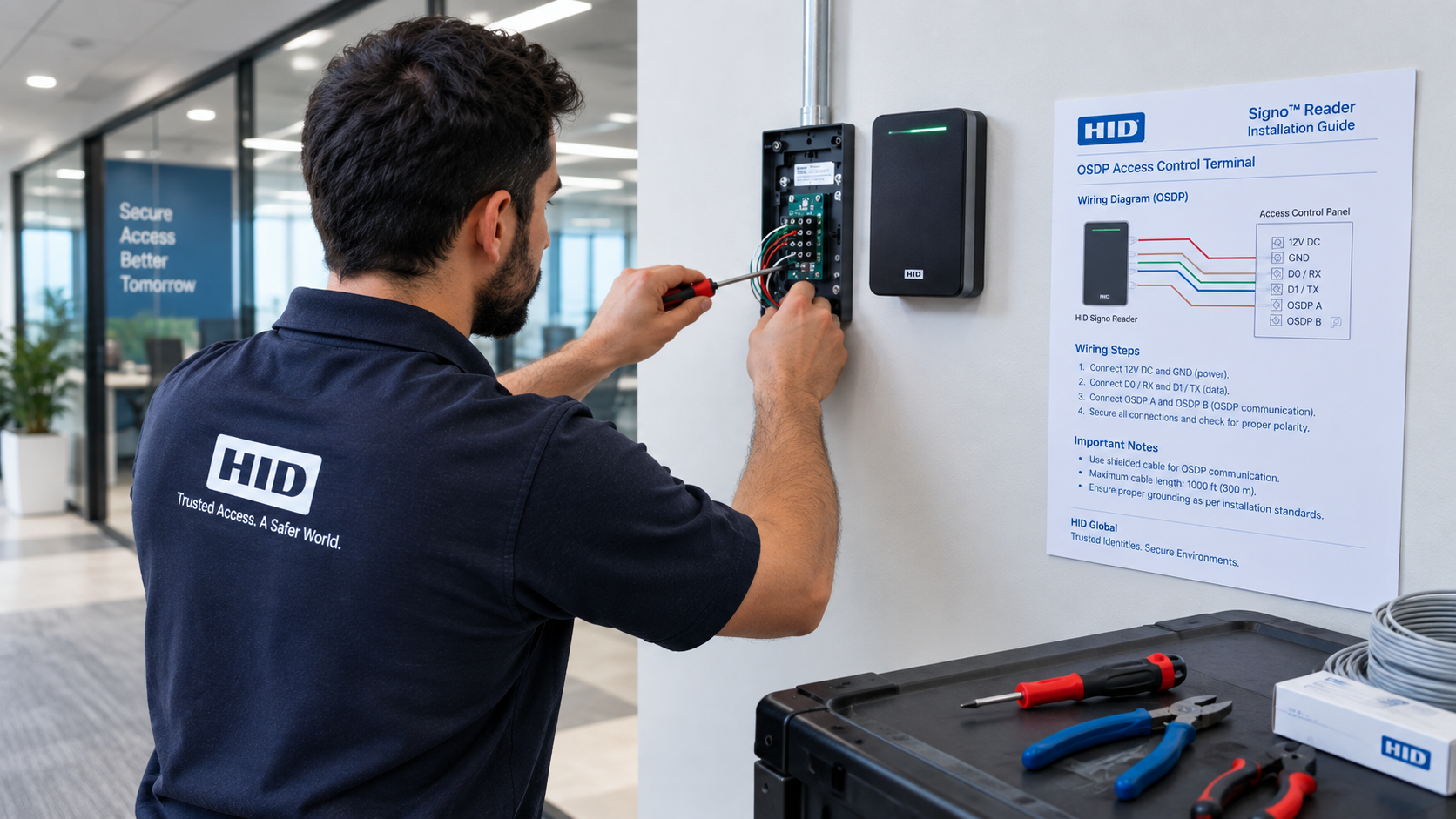
Elevating Physical Security: The Definitive HID Signo Reader Installation Guide
As physical security infrastructures adapt to modern hybrid workplaces and zero-trust corporate policies, commercial facilities require access hardware that balances uncompromising encryption with user-friendly credentials. The HID Signo reader family represents the modern benchmark for access control, supporting physical smart cards, mobile credentials via Apple Wallet and Google Wallet, and biometric verification under a unified architecture.
However, transitioning to enterprise-grade physical security requires more than just premium hardware—it demands a flawless hardware deployment. A poorly mounted reader, incorrect terminal wiring, or missing end-of-line resistors can expose a facility to communication dropouts, tamper vulnerabilities, or compliance failures. Whether you are outfitting a single corporate perimeter or managing a multi-floor facility, this HID Signo reader installation guide provides the technical framework necessary to execute a seamless, compliant deployment.
At XS Controls, we operate as an authorized specialist reseller of genuine HID Global physical access control systems and software. We understand that deploying high-performance security hardware requires precision, compatibility, and reliable support. In this technical walkthrough, we break down pre-installation planning, wiring architectures, physical mounting, and post-installation commissioning.
Pre-Installation Planning: Specifications and Requirements
Before unboxing your units, standardizing the installation environment is critical. This initial section of our HID Signo reader installation guide outlines the core electrical and physical parameters required across the Signo 20 (mullion mount) and Signo 40 (wall switch mount) models.
1. Power Supply Requirements
HID Signo readers operate on an input voltage range of 12V DC to 24V DC. Ensure your access control power supply unit (PSU) delivers clean, linear, or low-ripple switching power. Voltage drops over extended cable runs are a frequent cause of intermittent reader rebooting; verify that at least 12V DC reaches the reader terminals under full load (including LED and beeper activations).
2. Cabling Standards
- Wiegand Communication: Requires a minimum of 5- to 7-conductor shielded twisted pair cable (typically 18 to 22 AWG), limited strictly to an absolute maximum run of 150 meters (500 feet).
- OSDP (Open Supervised Device Protocol): Requires a 2-conductor shielded twisted pair (RS-485 standard, 22 to 24 AWG) with a 120-ohm nominal impedance, enabling cable runs up to 1,200 meters (4,000 feet).
Wiring Topologies: OSDP vs. Wiegand
A crucial decision highlighted in any modern HID Signo reader installation guide is choosing between legacy Wiegand protocol and secure OSDP.
┌───────────────────────────────────────────────────────────┐
│              COMMUNICATION PROTOCOL COMPARISON            │
├─────────────────────────────┬─────────────────────────────┤
│       Legacy Wiegand        │         Secure OSDP         │
├─────────────────────────────┼─────────────────────────────┤
│ • Unencrypted data transmission│ • AES-128 bidirectional encryption│
│ • Point-to-point only       │ • Multi-drop daisy-chainable│
│ • Max 150m (500ft) distance │ • Max 1,200m (4,000ft) dist │
│ • No device supervision     │ • Constant line supervision │
└─────────────────────────────┴─────────────────────────────┘
Wiegand Connections
If your installation requires legacy compatibility with older controllers:
- Connect Red to +VDC Power.
- Connect Black to Ground.
- Connect Green to Data0 (D0).
- Connect White to Data1 (D1).
- Connect Brown to LED control, Orange to Beeper control, and drain wire to Earth ground at the controller end only.
OSDP via RS-485 (Recommended)
OSDP v2 with Secure Channel Protocol (SCP) offers AES-128 bidirectional encryption to prevent skimming or replay attacks on the field wire. When following this HID Signo reader installation guide for OSDP:
- Wire the differential pair to RS-485 (A / +) and RS-485 (B / -).
- Terminate the end of the bus with a 120-ohm resistor across the A and B lines on the last reader in a multi-drop daisy chain.
- Ensure the shield wire is grounded at one single point (the control panel chassis) to prevent ground loops.
Step-by-Step Physical Mounting Procedure
Executing the physical mounting correctly prevents mechanical tampering and environmental exposure. Follow these chronological steps from our HID Signo reader installation guide:
Step 1: Surface Preparation and Backplate Attachment
Mark the mounting height according to local accessibility regulations (such as UK Equality Act standards, generally between 900mm and 1200mm from the finished floor). Secure the heavy-duty mounting plate using the provided countersunk screws. If installing onto a metal door frame or junction box, fit the optional plastic spacer plate to reduce RF interference caused by metallic shielding.
Step 2: Gasket and Environmental Sealing
Every outdoor installation covered by this HID Signo reader installation guide requires moisture protection. Signo readers feature an IP65 environmental rating, but proper cable egress sealing is mandatory. Ensure the rear rubber gasket is seated cleanly against the backplate, and use silicone sealant around the conduit entry point to prevent condensation accumulation inside the electronics bay.
Step 3: Engaging the Optical Tamper Sensor
The unit includes an integrated optical tamper sensor that detects removal from the mounting plate or surface breach. Fasten the mounting plate firmly so the light reflector sits flush against the sensor window.
Step 4: Securing the Reader Body
Hang the top tabs of the Signo reader body onto the upper edge of the mounting plate, pivot the reader downward until it seats, and insert the bottom security screw. Fasten it firmly using the specialized Torx security tool provided in the packaging.
Reader Configuration and Commissioning via HID Reader Manager
Hardware mounting is only half the process; digital commissioning finalizes the deployment. No complete HID Signo reader installation guide is comprehensive without addressing the HID Reader Manager mobile application.
Signo readers feature native Bluetooth Low Energy (BLE) connectivity, allowing technicians to configure parameters wirelessly without dismantling the device:
- Launch the App: Open the HID Reader Manager app on an authorized iOS or Android device.
- Establish Secure Pairing: Bring the device within proximity of the newly mounted reader to detect its broadcast beacon.
- Update Firmware: Check for and apply the latest firmware patches to protect against zero-day exploits and optimize card-read speed.
- Configure Output: Set the communication mode (OSDP address or Wiegand bit format) and customize LED visual feedback and acoustic buzzer signals.
- Enable Mobile Access: Load your organization’s proprietary Mobile Access keyset (MOB key) into the reader memory to allow users to tap their smartphones or smartwatches for entry.
Post-Installation Testing and Verification
To wrap up this HID Signo reader installation guide, execute a structured multi-credential test sequence before handing the site over to operations:
- Physical Credential Read: Present an encrypted smart card (such as Seos, iCLASS, or MIFARE DESFire) to verify instant read range and access validation.
- Mobile Tap/Twist Verification: Test mobile wallet passes via NFC and long-range BLE “Twist and Go” functionality to confirm signal consistency through corporate entryway glass.
- Tamper Trigger Validation: Loosen the bottom Torx screw and pull the reader slightly forward. Confirm that the access control software registers an immediate optical tamper alarm.
Why Choose XS Controls as Your Strategic Hardware Reseller?
Procuring high-security door readers requires an experienced partner who understands both physical door environments and complex network topologies. At XS Controls, we pride ourselves on being consultative hardware specialists rather than simple catalog distributors. We don’t just supply readers; we help engineering and IT teams design scalable access ecosystems.
When you purchase your HID hardware through XS Controls, you benefit from:
- Guaranteed Genuine Hardware: 100% authentic HID Global readers, credentials, and modules backed by factory warranties.
- Technical Commissioning Support: Dedicated access control specialists to assist your technicians through the steps in this HID Signo reader installation guide.
- Volume Pricing & Pre-Configuration: Competitive reseller tier pricing, custom key-loading services, and fast dispatch across commercial projects.
Conclusion: Modernize Your Perimeters with Confidence
Upgrading your physical security endpoints with HID Signo technology ensures your facility is ready for modern mobile credentials, robust OSDP encryption, and multi-technology verification. By following this detailed HID Signo reader installation guide, your installation teams can eliminate wiring mistakes, ensure strict compliance, and minimize operational downtime.
Ready to deploy industry-leading physical access control? Contact XS Controls today to request commercial quotes, order genuine hardware, or speak with our engineers for project-specific guidance on your next deployment.
